
Live
Northstar applies one 10% discount to three orders. The first formula works. The next one returns the full gross amount because copying it moved the discount reference into an empty cell. The problem is the reference, not multiplication.
Outcome: choose relative, absolute and mixed references from the relationship the formula represents. Prerequisite: lesson 1.
Put the discount in C3 as 0.10. In B6:B8 enter order labels, and in C6:C8 enter gross sales of 300, 450 and 600. In D6 enter =C6*(1-$C$3), then fill down through D8.
| Output | Formula after filling | Net sales (USD) |
|---|---|---|
| D6 | =C6*(1-$C$3) | 270 |
| D7 | =C7*(1-$C$3) | 405 |
| D8 | =C8*(1-$C$3) | 540 |
Each row needs its own sales amount, so C6 changes to C7 and C8. Every row shares the one discount, so $C$3 stays fixed. A dollar sign locks the coordinate immediately after it during copying. It does not protect the cell from editing or make the business assumption correct.
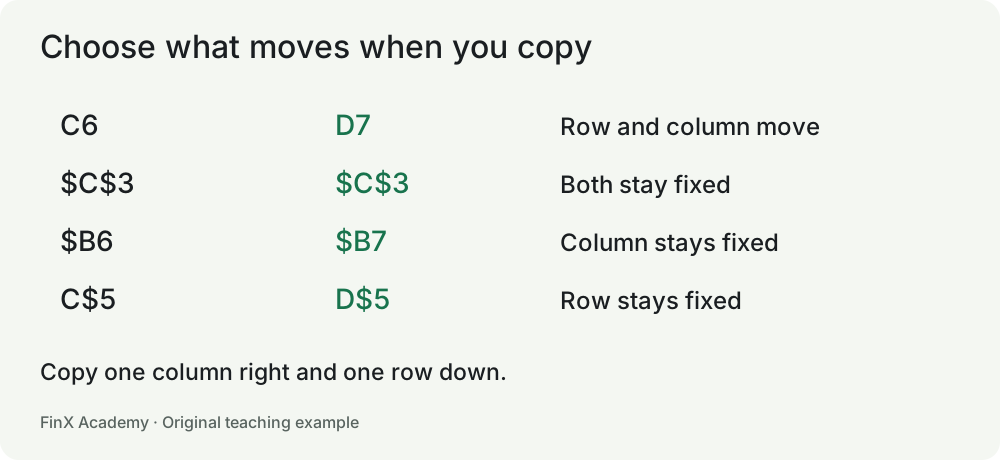
| Reference | Copy one column right and one row down | What stays fixed |
|---|---|---|
| C6 | D7 | Nothing |
| $C$6 | $C$6 | Column and row |
| $C6 | $C7 | Column only |
| C$6 | D$6 | Row only |
Do not memorize dollar signs without considering the layout. If every month has a different discount in row 3, =C6*(1-C$3) is appropriate when filling across months. Locking $C$3 in that layout would incorrectly apply the first month's assumption forever.
Build a price-volume grid. Put quantities 100 and 200 in B6:B7, and prices $20 and $30 in C5:D5. In C6 use =$B6*C$5. Fill across and down.
| Units / price | $20 | $30 |
|---|---|---|
| 100 | 2,000 | 3,000 |
| 200 | 4,000 | 6,000 |
The unit count always comes from column B but changes by row. The price always comes from row 5 but changes by column. D7 should therefore contain =$B7*D$5. Inspect the first, middle and last copied formulas. One correct corner does not validate a grid.
='Assumptions'!$C$3 reads C3 from the sheet named Assumptions. Single quotes support names containing spaces. A link to another workbook adds a dependency on that file and its availability. For these lessons, keep the inputs in the same workbook and label them rather than creating unnecessary external links.
Copying, cutting and inserting rows are not interchangeable operations. This lesson's reference table describes copying. After moving or restructuring a model, inspect the affected links again. If a formula depends on itself, directly or through other cells, you have a circular reference; redesign the dependency rather than enabling iteration to silence the warning.
Change the shared discount to 20%. The three net sales should become 240, 360 and 480. Restore 10%. Then change only the second order to 500: only its net sales should become 450. This tests both the shared input and the row-specific input.
A grader may accept mathematically equivalent formulas. Some single-cell graders ignore dollar signs when comparing formulas. That does not prove a formula is safe to copy. The desktop fill-and-change task assesses reference behavior directly; record it separately from a numerical exercise pass.
=C6*$C$3 from D6 into E7. What does it become?=$B$6*$C$5 in every cell.=D7*$C$3.=C8*C4 works for a single revenue row. =C8*C$4 also supports copying down when row 4 must stay the price source.=$B6*C$5 at C6, then fill. Fix the unit column and price row while allowing the relevant coordinate to change.Transfer: add a third price and third quantity. Predict the new bottom-right result, fill the formulas, and change one header to prove the new outputs use the intended input.