
Live
Outcome: trace an output to its drivers without overwriting source evidence. Prerequisite: lesson 1.
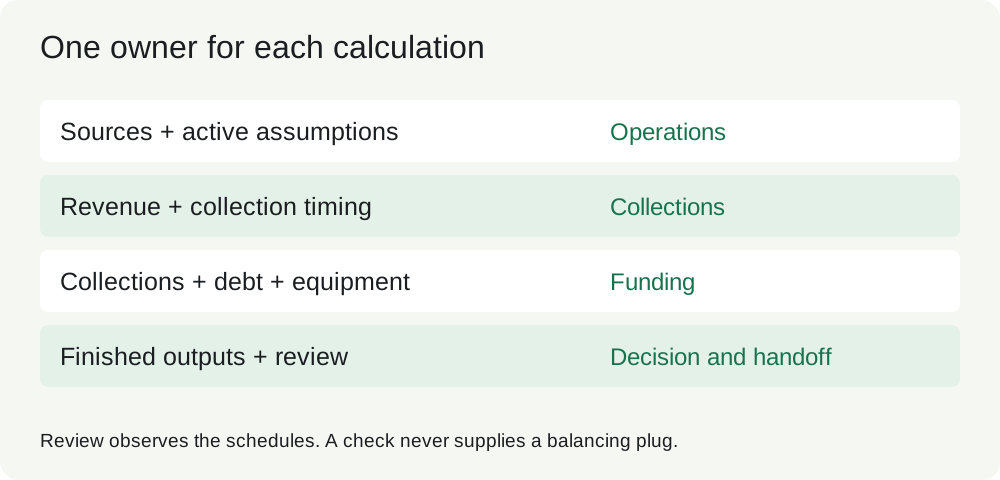
Four roles make a model readable. Sources preserve the supplied facts and their provenance. Assumptions contain forecast choices and controls. Schedules perform the business calculations. Outputs answer the decision. A check is a fifth, terminal role: it observes these areas and reports an inconsistency. It must not become an input that forces the model to agree with itself.
The workbook places Decision first, Assumptions next, then Operations, Collections and Funding. Sources and Review sit to the right. This physical order helps a reader; the calculation direction still runs from sources and active assumptions into schedules and outputs. A separate sheet is useful for each schedule here because linkage is a learning objective. A small single-purpose calculator can use labeled sections instead.
The original source pack identifies S1 opening balances, S2 equipment and capacity, and A1 management scenarios. Preserve an ID, description, unit, date and confidence limitation. A supplier quote and a management demand forecast are different evidence. Put the scenario price in Assumptions, not inside =Units*100. A constant such as twelve months per year is a labeled convention. Structural constants such as zero, one, or a row index are different from an undocumented commercial assumption.
Every column must use one unit. Here revenue equals service units multiplied by USD per service. The cash schedule uses USD. Costs and repayments are positive input amounts and cash outflows when subtracted. A negative closing cash balance means unfunded cash need before any additional financing; it is not an overdraft already obtained.
Use restrained formatting as a navigation aid. Editable financial inputs are blue on pale yellow, same-sheet formulas dark, cross-sheet formulas green, and decision outputs dark. The selected scenario is visible on every sheet. Color never substitutes for labels, a source record or access protection. The workbook is editable so learners can repair it; the color scheme does not lock cells.
Trace closing cash from Decision to Funding, then to Collections, then to Operations, then to the active price and units. Explain why a signed −24,000 equipment assumption would be wrong when the cash formula already subtracts capex.
Hint 1: count sign changes. Hint 2: use positive 24,000 in Sources and subtract the capex row once. Hint 3: a double negative makes buying equipment appear to generate cash.
A proper trace has one authoritative price for each period and one owner for each calculation. The output links to closing cash rather than recomputing all cash flows. A link to a local source cell avoids an external-workbook dependency. The handoff states that this workbook needs no external files, macros or refresh connections to recalculate.
A zero check can establish that signs implement a specified rule. It does not establish that the rule represents the actual contract. Reconcile the source and review its interpretation separately. For additional lookup and reference practice, reuse Excel for Financial Modeling; F06 focuses on how these mechanics work together.