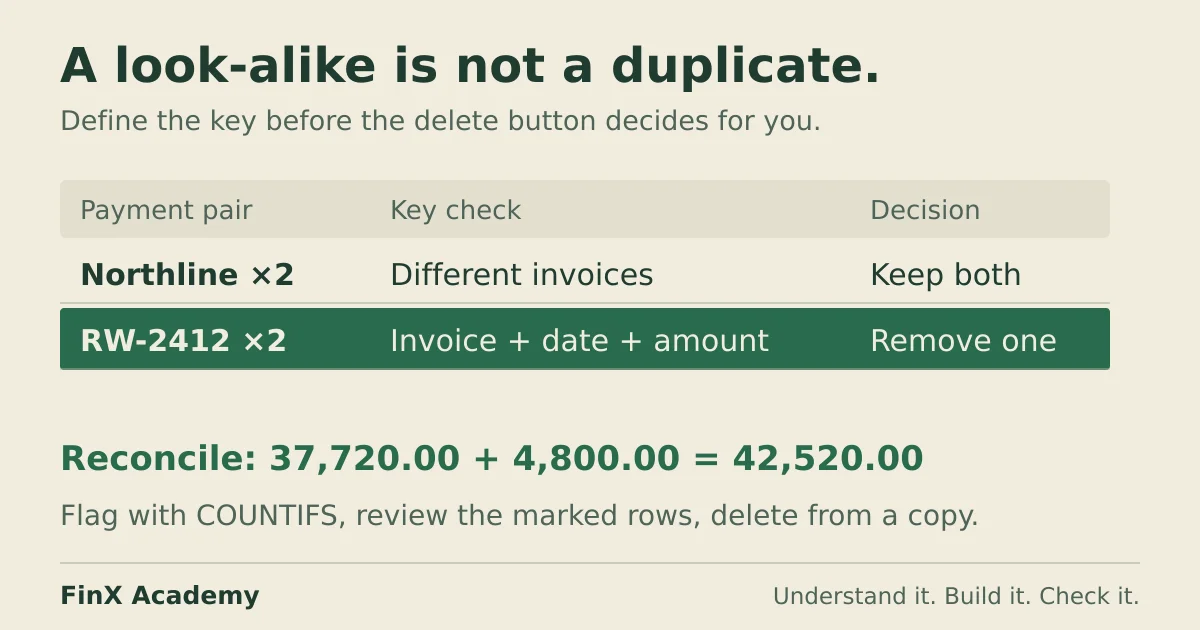
A row is only a duplicate against a chosen key, and in a payments ledger every shortcut key deletes real transactions. Flag with COUNTIFS on invoice + date + amount, review the marked rows, and reconcile raw = clean + removed before anything is deleted.
Excel’s Remove Duplicates command does not know what a duplicate is. You define it by ticking columns, and the command keeps the first matching record and removes later matches within the selected range or table. Columns outside that range stay in place. In a customer list that definition is easy. In a payments ledger it is a trap: legitimate finance transactions look like duplicates — recurring fees, installments, same-day invoices — and a careless key choice silently deletes real payments.
This page works through a twelve-row fictional ledger: one genuine re-keyed duplicate, three look-alike pairs that are all legitimate, the key that survives both facts, and a preview-and-reconcile workflow that never deletes anything you have not reviewed. Amounts are in one currency.
The ledger
Enter the headers in A2:D2 and the records in rows 3–14 of a blank sheet:
| Row | A: Invoice | B: Supplier | C: Payment date | D: Amount |
|---|---|---|---|---|
| 3 | RW-2412 | Ridgeway Facilities | 5 Mar 2026 | 4,800.00 |
| 4 | RW-2412 | Ridgeway Facilities | 5 Mar 2026 | 4,800.00 |
| 5 | NS-118 | Northline Software | 1 Mar 2026 | 4,800.00 |
| 6 | NS-121 | Northline Software | 1 Apr 2026 | 4,800.00 |
| 7 | GL-887 | Gilmerton Logistics | 12 Mar 2026 | 2,500.00 |
| 8 | GL-887 | Gilmerton Logistics | 26 Mar 2026 | 1,500.00 |
| 9 | HB-3301 | Hollow Brook Print | 9 Mar 2026 | 940.00 |
| 10 | KC-2245 | Kestrel Consulting | 11 Mar 2026 | 7,250.00 |
| 11 | KC-2246 | Kestrel Consulting | 11 Mar 2026 | 7,250.00 |
| 12 | RW-2418 | Ridgeway Facilities | 19 Mar 2026 | 1,150.00 |
| 13 | TR-77 | Vantage Trade Supplies | 23 Mar 2026 | 630.00 |
| 14 | HB-3309 | Hollow Brook Print | 30 Mar 2026 | 2,100.00 |
The control total: =SUM(D3:D14) = 42,520.00.
The story behind these rows: the payments clerk re-keyed Ridgeway invoice RW-2412 on the wrong day and pasted the same row twice (rows 3–4 — the genuine duplicate). Everything else is what finance actually does:
- Rows 5–6: Northline’s monthly software fee. Same supplier, same 4,800.00, a month apart. Both real.
- Rows 7–8: Gilmerton invoice GL-887 was settled in two installments, 2,500.00 then 1,500.00. Same invoice number twice; both payments real.
- Rows 10–11: Kestrel ran two engagements billed at the same 7,250.00 fee and paid on the same day. Different invoice numbers; both real.
In this fictional example, invoice codes are supplier-specific, dates contain no time component, and amounts are numeric to two decimal places. The duplicate payment is confirmed against the bank/payment register; matching values alone cannot prove duplication.
Before reading on: how many rows would you delete, and which columns did you decide to compare? Hold your answer — the section after next shows why three of the four obvious keys are wrong.
A duplicate is a key, not a fact
Suppose you hand this ledger to the Data ▸ Remove Duplicates dialog. It asks which columns define a duplicate. Try the plausible choices against the story above:
| Key (ticked columns) | Rows removed | Real transactions destroyed |
|---|---|---|
| Supplier + amount | 3 (rows 4, 6, 11) | 2 — Northline’s April fee, one Kestrel engagement |
| Invoice number | 2 (rows 4, 8) | 1 — Gilmerton’s 1,500.00 installment |
| Supplier + date + amount | 2 (rows 4, 11) | 1 — one Kestrel engagement |
| Invoice + date + amount | 1 (row 4) | None ✓ |
Each of the first three keys finds the genuine duplicate in row 4 — and then keeps deleting. Supplier + amount removes 16,850.00 across three rows: the 4,800.00 re-key plus 12,050.00 of legitimate payments. Invoice alone costs the second installment of GL-887, which is a real payment against a real unpaid balance. The invoice + date + amount combination identifies only the confirmed duplicate in this dataset. It is not a universal payment key. Across suppliers, include a stable supplier ID; across entities or currencies, include those fields too. Two real same-day, same-amount installments on one invoice require distinct payment or bank transaction IDs.
That is the whole lesson in one line: choose the key by looking for the rows that merely look alike. The dialog does not do this work for you; it applies whatever definition you tick.
Preview with a flag, not with the delete button
Microsoft’s own guidance recommends confirming expected results by filtering or conditional formatting before removing duplicates, and explains that it removes duplicate records while retaining the first occurrence. Undo can reverse the action while available, but keep a separate raw copy for a durable audit trail. A flag column does the preview with arithmetic instead of a dialog, so every decision is visible and reversible:
| Cell | Formula | Returns for row 3 |
|---|---|---|
| E3 (copy down to E14) | =COUNTIFS($A$3:$A$14,A3,$C$3:$C$14,C3,$D$3:$D$14,D3)>1 |
TRUE |
The locked ranges are what make the count compare the whole ledger rather than a sliding window — the same anchoring discipline as the absolute-reference guide. The flag marks both rows 3 and 4: it answers “this payment matches another payment”, not “this one is the copy”. The review decision is yours to make: keep the row that carries the bank reference or the original approval, and treat the other as the duplicate. Do not assume “first in the sheet” is “first in reality” — the dialog keeps the row that happens to sit on top, which in an unsorted export may be the re-key.
The flag uses COUNTIFS criteria matching. These invoice codes contain no wildcard characters and differ neither by letter case nor by blank keys. In a real extract, validate those assumptions: * and ? can act as wildcards, blanks can match unexpectedly, and letter case does not distinguish identifiers.
Delete from a copy, then reconcile three ways
A safe clean-up leaves an audit trail. The workflow:
- Preserve an unchanged raw sheet and make a separate working copy. Row numbers alone are not a backup.
- Filter E to
TRUE, review rows 3–4 against the payment register, and copy the confirmed duplicate plus its source row ID and review reason toremoved-duplicates. - Clear the filter. On the working copy, select the complete record range A2:E14, choose Data → Remove Duplicates, confirm My data has headers, and tick only Invoice, Payment date and Amount as the key. Leave Supplier and the helper flag unticked; their cells still move with each record. Keep the full record range selected so unrelated columns cannot become misaligned. The dialog should report 1 duplicate removed, 11 unique records remaining.
- Undo immediately if that count differs. For this case the confirmed copy is the second occurrence, so keeping the first is correct; if a different occurrence must survive, arrange or remove the reviewed record explicitly before applying the command.
- On the cleaned sheet, reconcile:
| Check | Formula | Must equal |
|---|---|---|
| Rows | clean rows + removed rows | 11 + 1 = 12 |
| Amounts | =SUM(D3:D13) on the clean sheet |
37,720.00 |
| Control total | clean + removed | 37,720.00 + 4,800.00 = 42,520.00 |
| Per supplier | Ridgeway payments after clean-up | 4,800.00 + 1,150.00 = 5,950.00 |
The third line is the one that catches sloppy edits: the pre- and post-cleaning totals must differ by exactly
the sum of the rows you moved, and the removed-duplicates tab is its own receipt. The fourth line is the
independent check: Ridgeway’s payment register should show 5,950.00 for March. If the ledger says 10,750.00,
the duplicate is still in there — no key choice required to notice.
When the key misses: a trailing space
Change row 4’s invoice cell to RW-2412 — the same text with one trailing space, exactly what a paste from
a portal export produces. Now the flag returns FALSE for both rows 3 and 4: RW-2412 and RW-2412 are
different text, so the composite key finds no duplicate, and every formula-internal check still passes.
The ledger is still 4,800.00 over the register. The per-supplier reconciliation catches it; the key does not.
The fix is to normalize before comparing. COUNTIFS cannot apply TRIM to its ranges, so build the key in a
helper column and count on that instead. In F3, enter:
=TRIM(A3)&"|"&TEXT(C3,"yyyy-mm-dd")&"|"&TEXT(D3,"0.00")Copy it down to F14, then put =COUNTIF($F$3:$F$14,F3)>1 in E3 and copy down. The helper turns the three fields into one comparable
text value, so the trailing space disappears before the count happens — and dates that two exports formatted
differently collapse to one TEXT rendering too. The sibling failure — numbers stored as text — is diagnosed
on the convert-text-to-numbers guide; the detection habit is the same:
reconcile against an external control, because a variant spelling makes the duplicate invisible to the key,
not impossible.
Keep the raw fields. TRIM removes ordinary spaces but not non-breaking spaces by itself, and also collapses repeated internal spaces. This helper assumes that change is valid for these invoice codes, that amounts have at most two decimals, and that time of day is irrelevant. Do not round away meaningful amount differences or strip significant identifier characters. Microsoft also documents that the Remove Duplicates dialog can compare displayed cell content, so align date/number formats and data types before expecting its results to match formula flags. If using the normalized key for deletion, include F in the selected record range and tick only that reviewed key.
Check your answers
- Control total 42,520.00; the genuine duplicate is row 4 alone (4,800.00); cleaned ledger 37,720.00 across 11 rows.
- Keys: supplier+amount removes 16,850.00 (12,050.00 legitimate); invoice-only removes 6,300.00 (1,500.00 legitimate); supplier+date+amount removes 12,050.00 (7,250.00 legitimate); invoice+date+amount removes exactly 4,800.00.
- The
COUNTIFSflag marks both row 3 and row 4 — review decides which is the copy. - Trailing-space re-key: flag finds nothing, internal checks pass, Ridgeway per-supplier total (10,750.00 vs register 5,950.00) catches the 4,800.00.
Practice this on the ledger you own
Duplicate hunting is one step in the Excel for finance workflow: extract, flag, review, reconcile, report. Rebuild the twelve rows above yourself, then run the four keys and the flag on your own AP extract — with a copy of it, and with the register reconciliation in place before you delete anything. FinX’s Excel for Finance course works through ledger cleaning, lookups and conditional totals with structured spreadsheet practice — browse the catalog for current lessons. The free ten-minute diagnostic asks five numeric modeling questions; it does not grade a clean-up.
Continue with guided practice
Build on this guide with spreadsheet exercises on formulas, lookups and financial functions. Explore the syllabus and start with a free lesson.
Excel for Finance course